Gear up, Guardian.
A small set of tools for managing your vault, building loadouts, learning the game, and tracking every raid, dungeon and Trials run.
The tools
These run in your browser, nothing to install. For your PC, see Downloads below.
Vault
A fast, keyboard-first inventory manager. Search, move and equip weapons and armor across your characters and vault.
Open vault → build.legendz.menLoadout Editor
Plan a full build: armor stats and set bonuses, weapon perks and mods, subclass, and artifact. Share it as a link or export it as a PNG.
Start a build → guide.legendz.menGuide
Legend'z Guide to Destiny: classes, exotics, raids, dungeons, Crucible, Gambit and expansions, all in one searchable place.
Read the guide → clears.legendz.menClears
Raids, dungeons, Grandmasters and Trials for any Guardian: full clears, lowmans, flawless runs, fastest times, and who was in every run.
Look up a Guardian →Downloads
Small tools that run on your PC.
-

Vault Overlaylatest
LegendzVaultOverlay-win-Setup.exe
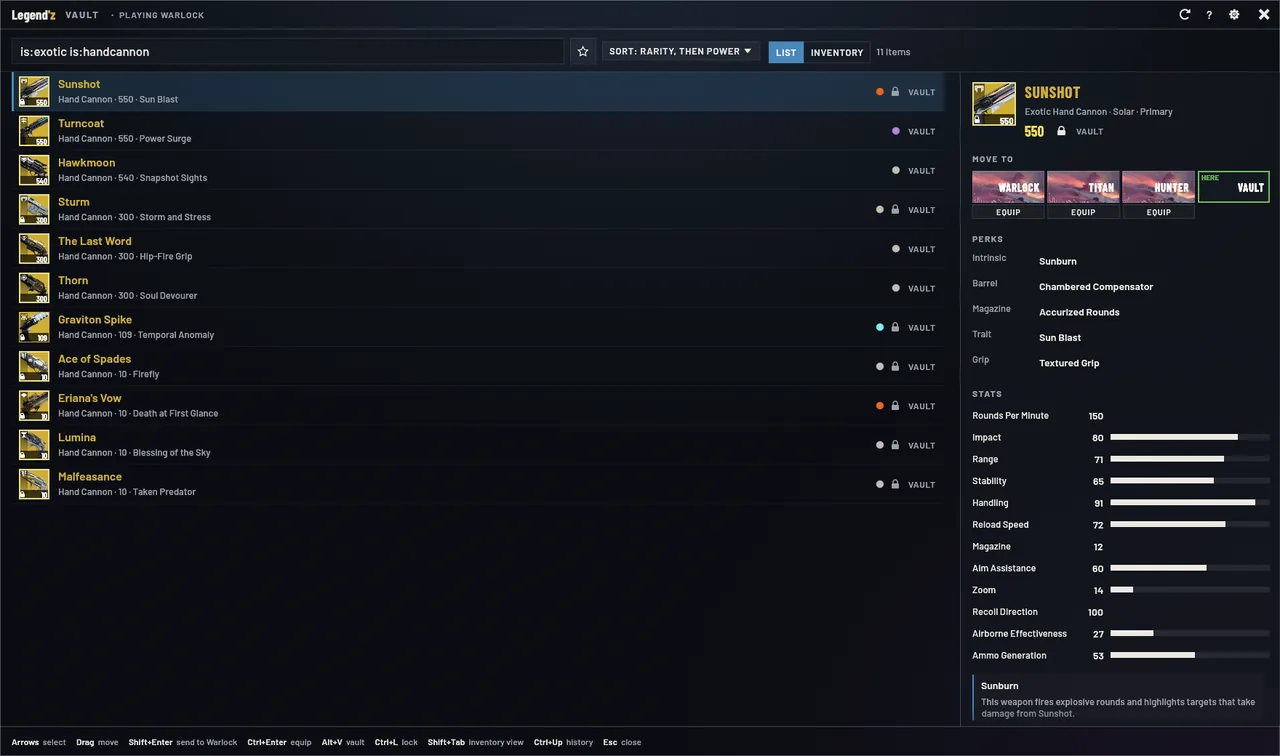
46 MB · Windows 10/11Press Alt + Space in Destiny 2 and your vault opens over the game. Search like DIM, read the roll, and send, equip or drag gear between characters without alt-tabbing. One installer, nothing else to set up, and it keeps itself up to date.
Also has optional skating and grapple macros that follow the character you're playing. They're off until you turn them on in Settings → Macros. Macros send keypresses to the game; use them at your own risk.
The installer isn't code-signed, so Windows SmartScreen may warn the first time: choose More info → Run anyway. Updates install without the warning.
Install the Vault Overlay
A small Windows app for Destiny 2. Press Alt + Space while the game is in front and your vault opens on top of it; press it again and you're back in the game. Everywhere else, Alt + Space is left alone. It talks to Bungie.net straight from your PC, so nobody else's server is involved. Setup takes about a minute, and it updates itself after that.
Using the 0.1.0 zip or the Wox plugin? Switch to the installer.
The zip and the Wox plugin don't update themselves; the installer does. Your settings, saved searches and Bungie app come along:
- Quit the old copy: open it, then Settings → Quit the overlay (or untick Start with Windows first if you had it on).
- Run the installer (step 01). Coming from the zip, it opens already logged in with your own Bungie app. Coming straight from the Wox plugin, it starts on the Legend'z app, so log in once (step 02); your own app is still there under Settings → Bungie app.
- Delete the old folder you unzipped, and uninstall Wox if you only kept it for the plugin. Node.js isn't needed anymore either; the installer brings its own.
Turn Start with Windows back on in the new copy if you want it.
-
Download and install
Download
LegendzVaultOverlay-win-Setup.exeand run it. It installs for your Windows account only (no admin prompt), adds Start menu and desktop shortcuts, and opens the overlay when it's done. There's nothing else to install.The installer isn't code-signed, so Windows SmartScreen may warn the first time. Choose More info → Run anyway.
-
Log in
The overlay opens on Log in to Bungie.net. Click it, and your browser opens Bungie's consent page. After you approve, the login passes back to the overlay on your own PC and you can close the tab. Using your own Bungie app instead? Its redirect is
127.0.0.1with a self-signed certificate, so the browser warns once: click Advanced → Continue to 127.0.0.1.If the browser can't reach that page, copy the full address from its address bar, paste it into the box under Browser couldn't reach it? in the overlay, and click Finish.
The first load downloads Destiny's item database, which takes about 5 seconds. After that it's cached on your PC. You stay logged in for 90 days.
-
Use it
Run Destiny 2 in Windowed Fullscreen (Settings → Video → Window Mode). In exclusive Fullscreen, Windows minimizes the game whenever anything appears on top of it.
Press Alt + Space in the game and start typing. Plain words match item names, perks and types, and filters work like DIM:
fatebringer
is:handcannon is:solar perk:"kill clip"
is:dupe -is:locked
is:armor stat:total:>=65 is:hunter
Suggestions drop down as you type; Tab or Enter fills one in. Click an item, or move to it with the arrow keys, and its perks and stats show in the sidebar along with a card for each character and the vault.
Alt+Space Open / close over the gameArrows Move through the resultsShift+Enter Send to the character you're onCtrl+Enter Equip on the character you're onAlt+V Send to the vaultCtrl+L Lock / unlockShift+Tab List / inventory viewCtrl+↑ Previous searchesAlt+1…9 Run a saved searchEsc Clear the search, then closeMoving gear: drag an item onto a character (or its card in the sidebar) to send it there, onto an equipped slot or an Equip button to equip it, or onto the vault. Double-click brings an item to the character you're playing. Right-click shows every option. Menus and buttons only offer armor to its own class, but you can still drag it anywhere.
Equipping only works in orbit, in a social space, or while you're offline. That's a Bungie API rule.
-
Make it yours
Click the gear in the top-right corner, or press Ctrl + ,:
- Start with Windows: turn this on so the overlay is always ready. It costs next to nothing while you're not playing.
- Only run the search backend while Destiny is running (on by default): the overlay starts its search engine when the game starts and stops it 10 seconds after the game closes.
- Opens in: list or inventory view.
- Theme, accent color and transparency: lower the transparency to see the game through the background.
- Updates (on by default): new versions download in the background and install while the overlay is closed and Destiny isn't running, so it never restarts mid-game. Check now looks right away.
- Bungie app: the Legend'z app, or your own (below).
Use your own Bungie app instead
Optional. With your own app, the overlay talks to Bungie under your app's name and rate limit instead of the shared Legend'z one. It's free:
- Go to bungie.net/en/Application, sign in, and click Create New App:
Application Name Anything, e.g. My Vault OverlayOAuth Client Type Confidential (a Public client works too, but logs you out every hour) Redirect URL https://127.0.0.1:55372/callbackScope Check Read your Destiny 2 information and Move or equip Destiny gear Origin Header Leave empty - Agree to the terms and create it. The app page shows the API Key, OAuth client_id and OAuth client_secret.
- In the overlay, Settings → Bungie app → Use my own Bungie app, paste the three values, leave the port at
55372, and save. Then log in again.
Treat the client secret like a password. Don't paste it in Discord or share screenshots of the app page.
To uninstall: Windows Settings → Apps → Legend'z Vault Overlay → Uninstall. Your settings, keys and login stay in
%APPDATA%\vault-overlay; delete that folder too to remove everything.